Working in high-volume photography fields, like school and sports photography, requires a particular set of skills. You need to be extremely organized and efficient to manage and arrange large groups of people in the right places and positions to capture the best images, for instance.
Even when the shoot is over, the challenges aren’t. You still have to categorize and process large amounts of images, tagging them, grouping them, culling some and editing others consistently, all while adhering to tight deadlines. It’s not easy, but programs like GotPhoto exist to help you.
Indeed, GotPhoto is a high-volume photography platform, and it has recently added new AI-powered features and workflows with the potential to save users hours of time on future edits.
Do these updates live up to the hype? Read on through my GotPhoto review to find out.
What Does GotPhoto Offer?
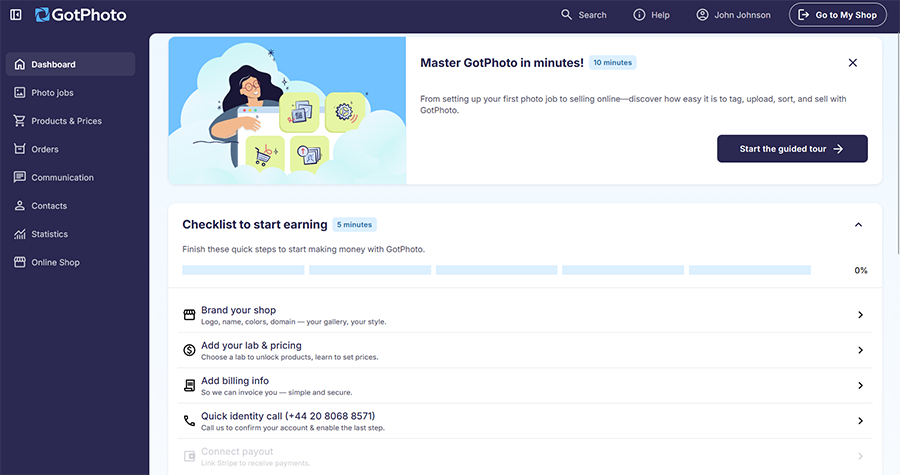
For those who aren’t familiar with GotPhoto, this is a platform for high-volume photography, aimed specifically at those who regularly take pictures of students, youth sports leagues, dance studios, graduation photos, and headshots.
It aims to solve many of the problems that high-volume photographers often face, primarily related to the amount of time and energy they have to spend manually going through their photos, culling, tagging, sorting, and editing.
Some of its key features include a smart tagging system, in which photos can be automatically organized using QR codes, full online sales integration to allow users to share and sell pictures as quickly as possible, and a comprehensive order management system.
GotPhoto has long offered time-saving tools for high-volume photographers, and recently, like many other photography platforms, it has expanded its use of AI technology.
New AI features include automated touch-ups, photo enhancements, and background removals, which, according to the platform’s developers, help users enjoy two times faster editing times. When you’re working with hundreds or thousands of photos, that sort of increase can make a massive difference.
New AI Features of GotPhoto
GotPhoto offers a broad selection of functions and features, as mentioned earlier. However, for the purposes of this particular review, I’m going to focus purely on the new AI-powered features that have been added recently, like AI background removal and automated color correction.
Perfectly Clear Automated Touchups
Let’s start with arguably the most appealing of GotPhoto’s AI-powered features: automated color, exposure, and white-balance correction and photo enhancement. In a nutshell, this allows you to instantly carry out some simple but effective edits on your images with the aid of AI.
Here’s how it works.
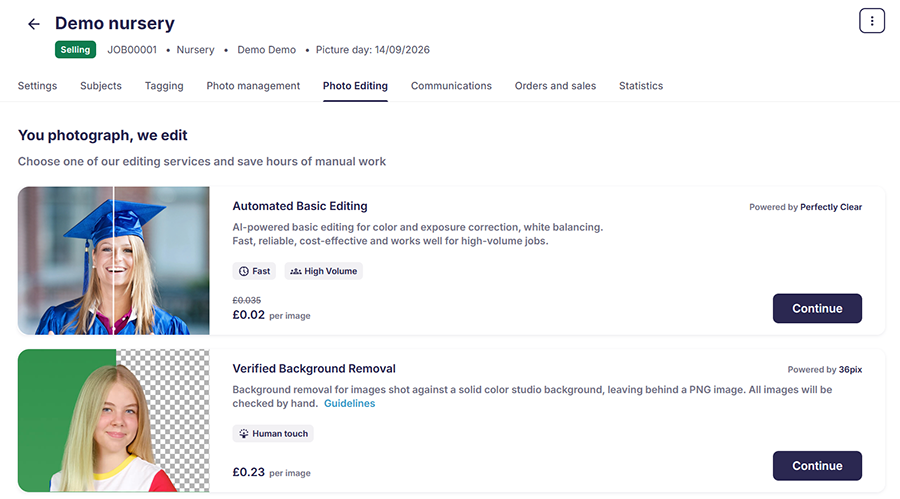
First, I log into my GotPhoto account and head to the “Photo jobs” section to find and select the specific job I want to work on. For the purposes of this review, I’ll use a demo shoot.

After clicking on the job, I simply have to move over to the “Photo Editing” tab to find the new AI-powered editing features. At the top of the list is “Automated Basic Editing,” which is powered by Perfectly Clear – a third-party automated image enhancement and correction technology.
I simply click on “Continue” to proceed.
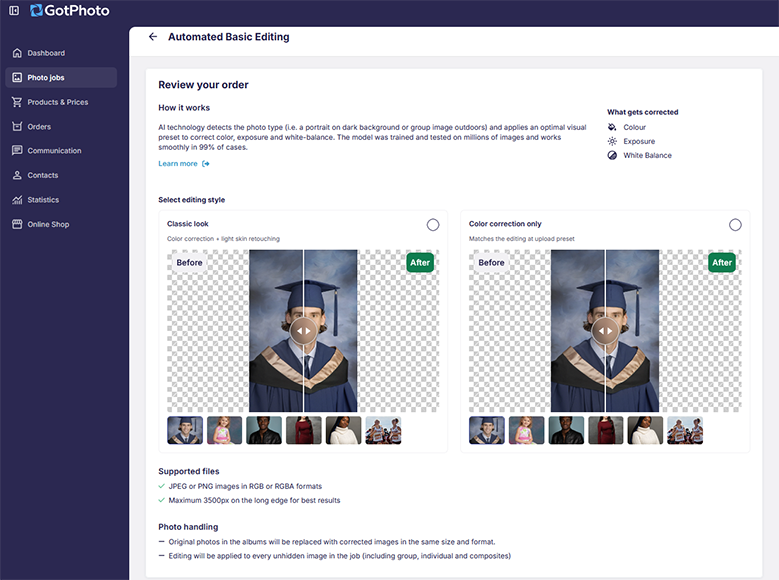
The next screen invites me to review my order and explains how the technology actually works. Without going into extensive detail, the AI scans each image to understand the light balance and then automatically applies a visual preset to make it clearer, brighter, and sharper.
I’m also given the option, on this page, to choose between either the “Classic look” editing style or “Color correction only.”
The “Color correction only” option is the simpler of the two. All it does is fix the lighting to improve brightness and balance, without making any major changes to the subject itself or the background.
The “Classic look” option, meanwhile, fixes the lighting and also carries out some light touch-ups of the subject, gently masking imperfections and making hair look more lustrous and beautiful, for example.
I was pleased to see that GotPhoto offered these two distinct options, as some AI-powered editors give you less control over the changes they make. You might be fine with that, but there may also be cases where you only want the color corrections and prefer to do your touchups manually.
Obviously, one of the big questions with this type of technology is: how well does it work? Well, here’s what a picture looks like before applying the AI-powered edits.
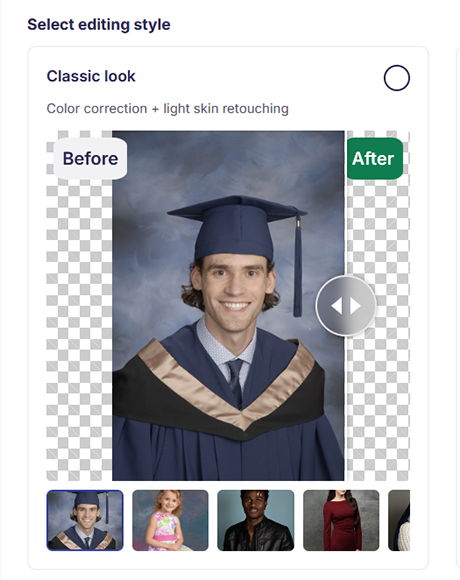
Next, here’s that same photo having undergone the AI enhancements.
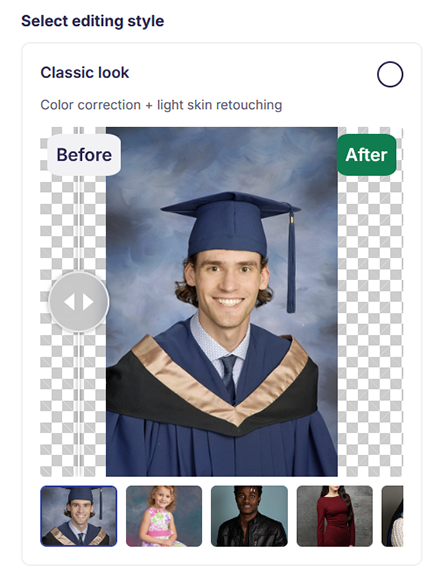
As you can see, the final photo is brighter, lighter, and simply better overall. Colors pop and details appear sharper, and while this photo may still need some minor touch-ups, it appears much more ready to promote, share, and even sell than the original, which was a little dark and washed out.
Pure Photos Background Removal
Another AI-powered feature that is integrated into GotPhoto is an AI-powered background-removal service provided by Pure Photos. Like Perfectly Clear, Pure Photos is a pre-existing third-party technology that has been incorporated into GotPhoto, designed specifically for isolating subjects and making backdrops disappear.
There are plenty of AI background removal tools out there, and I’ve tested plenty of them myself, but Pure Photos is certainly one of the best, as it doesn’t tend to make the same mistakes that other tools sometimes do.
In my experience, for example, if you try to remove the background behind a subject with frizzy or curly hair, some of their hair may get lost in the process. The same applies when working with subjects wearing elaborate outfits or holding props.
Pure Photos, however, manages to succeed where other tools fail, and here’s how it works in GotPhoto:
Again, I select my project, head to the “Photo Editing” tab, and scroll down to find the “Automated Background Removal Powered by Pure Photos” option.
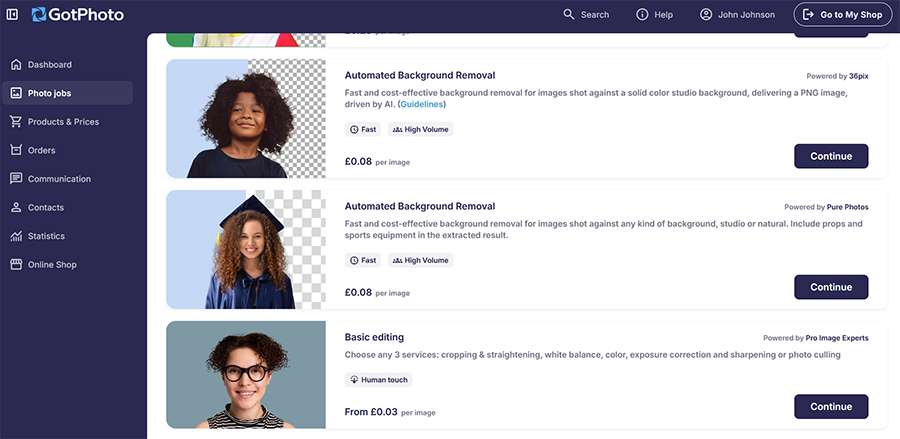
On the next page, I can see how the technology works, and GotPhoto helpfully provides some pointers, explaining which types of photos tend to work best with this tool and which ones may have problems. This demonstrates that this technology isn’t quite perfect yet and still has room for improvement.

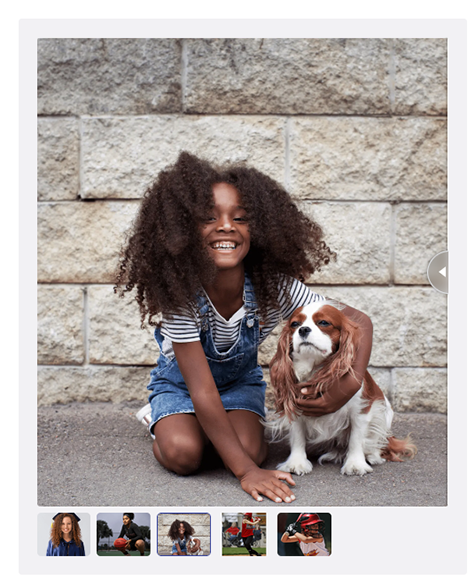
Generally speaking, however, it works quite well in my experience. Here’s a look at a picture before removing the background.
Now here’s that same image with the subjects isolated and the background taken out.
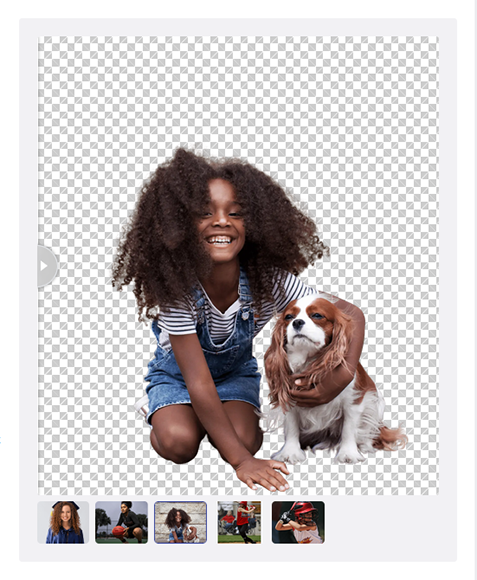
Many tools would have struggled with a picture like this, due to the difficult nature of dealing with the girl’s curly hair and the dog’s fur. Pure Photos, however, managed to get rid of the background almost flawlessly, without cutting into either subject’s silhouette.
Facial Recognition Tagging (With SpotMyPhotos)
Finally, the third big AI-powered feature added to GotPhoto is a facial recognition tagging system. The way this works is by using AI to detect faces across your photos and group them together based on the subjects’ identities.
Like the other features, this one also relies on a third-party service named SpotMyPhotos. However, unlike the others, SpotMyPhotos isn’t actually built into the GotPhoto platform, so you have to create a separate account on the SpotMyPhotos app, which is available on both Android and iOS.
Once you’ve done that, you can create a job in GotPhoto and upload a list of your subjects’ names, which you can sync to SpotMyPhotos. Then, using reference photos of each subject, you can let the AI and facial recognition software automatically figure out who’s who.
As new photos are taken and added to the job, they’ll be automatically sorted with the help of SpotMyPhotos. Thanks to this, you won’t have to spend hours at the end of your shoot sorting pictures based on who is in them.
It can make life easier for your clients, too, as they’ll get to see the specific photos they appear in more quickly via their own private galleries, which may also lead to additional or faster sales than usual.
On the whole, I found this feature to be extremely accurate. The facial recognition technology works extremely well, so even if your subject changes clothes or you capture their face from a completely different angle, the app should still usually be able to work out who they are.
The only downside is the setup. I’d much prefer if the “SpotMyPhotos” software could simply be incorporated into the GotPhoto platform, rather than having to make a separate account on a separate app and manage that every time I want to use it.
Pricing
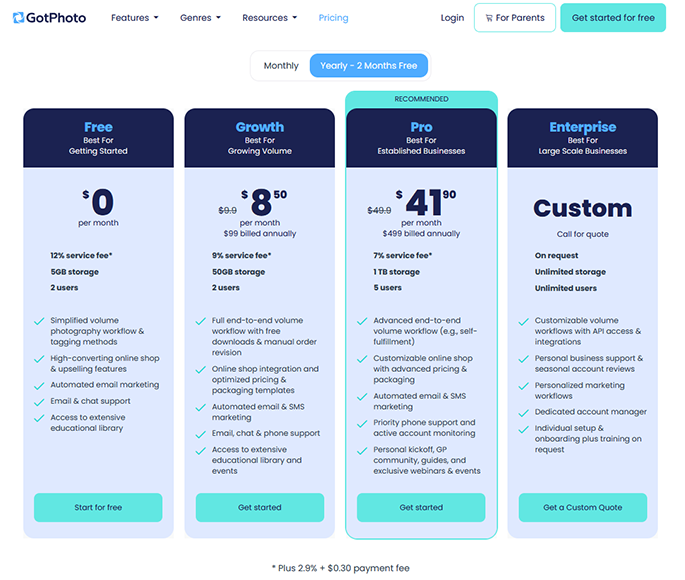
Price-wise, GotPhoto offers four plans, with monthly and annual pricing available for the Free, Growth, and Pro tiers:
- Free: As the name states, this plan is completely free and is useful for those who are just starting and want to get a feel for the platform before committing to a paid plan. It offers 5GB of storage, two users, and a simplified volume photography workflow.
- Growth: The Growth plan costs $9.90 per month when billed monthly, or $8.50 per month when billed annually, and comes with 50GB of storage, two users, online shop integration, automated marketing, and full end-to-end volume workflows.
- Pro: Starting at $49.90 per month when billed monthly, or $41.90 per month when billed annually, the Pro plan is aimed at established businesses that regularly deal with high-volume photography events. It comes with 1TB of storage, support for up to five users, all of the Growth plan features, plus advanced workflows and custom shop support.
- Enterprise: Finally, the Enterprise plan has a custom pricing scheme which will vary depending on how big your business is, how many users you want to have access to the platform, and how much storage you need.
A big difference between the pricing plans is that the service fee you pay to the platform decreases as you move up the pricing tiers, from 12% on Free to 9% on Growth and 7% on Pro. So, if you expect to make a reasonable number of sales through GotPhoto, it can be worth it to upgrade to a higher plan to pay fewer fees.
I also want to point out, however, that the AI features I spoke about earlier – namely the Pure Photo and Perfectly Clear features – incur additional fees. Perfectly Clear, for example, costs $0.02 per photo.
I found this to be slightly disappointing, as I would have hoped that such helpful features would at least be included in the more expensive subscription plans. However, it seems that, at least for now, GotPhoto will continue to make users pay for every image that is altered with AI in any way.
For those with smaller budgets, this will obviously be an issue. The actual processing fee may seem small, but when you regularly deal with batches of several hundred or thousand photos, it will quickly add up, and you may have to increase your own charges slightly to recoup those expenses.
The Final Word – Is GotPhoto Worth It for High-Volume Photography?
I’ve used GotPhoto in the past and was always impressed with the clever ways in which it attempted to make life easier for high-volume photographers, but these new AI features certainly elevate the platform to another level of productivity.
The Pure Photo and Perfectly Clear features can make high-volume editing much faster, with processing times ranging from minutes to several hours depending on the service and number of images. The facial recognition feature, meanwhile, is a little awkward to set up, but can also save you plenty of time and hassle in the long run.
I’m not too pleased with the pricing side of these features, and I feel that those who pay the higher subscription rates should get at least some sort of discount or monthly free allowance, but it remains to be seen if GotPhoto’s developers will change this in time.
Even with this caveat, however, my overall view is that GotPhoto’s AI features are excellent additions. They’re perfect for those who are already invested in the GotPhoto ecosystem, and if you haven’t tried this program before, these AI add-ons make it even more appealing, provided you can afford the fees.
More: Recommended Photo Editing Software for Sports Photography